Legend Filters
Legend Filters allow you to show and hide elements in visualizations by clicking on legend items. This is helpful for finding what you need in busy, complex views.
Using Legend Filters
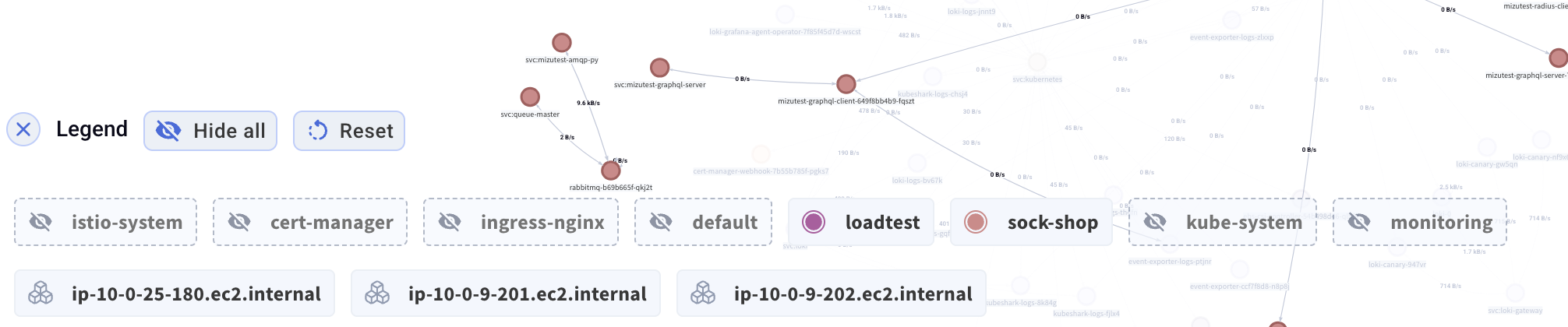
In the Workload Map (and soon other tabs), a legend appears with clickable items representing namespaces, nodes, and other elements. Click on any legend item to toggle its visibility.
Controls
- Hide all - Hide all elements at once
- Reset - Restore all elements to visible
How It Works
Each legend item represents a category of elements (e.g., a namespace or node). When you click a legend item:
- Filled icon - Elements are visible
- Empty/outline icon - Elements are hidden
This allows you to quickly isolate specific namespaces or nodes in a complex Workload Map, making it easier to focus on the traffic and connections you care about.
Example Use Case
In a cluster with many namespaces, you may want to focus on just one or two namespaces of interest. Instead of manually searching through a crowded map:
- Click Hide all to hide everything
- Click on the one or two namespaces you want to see
- The map now shows only the selected namespaces and their connections