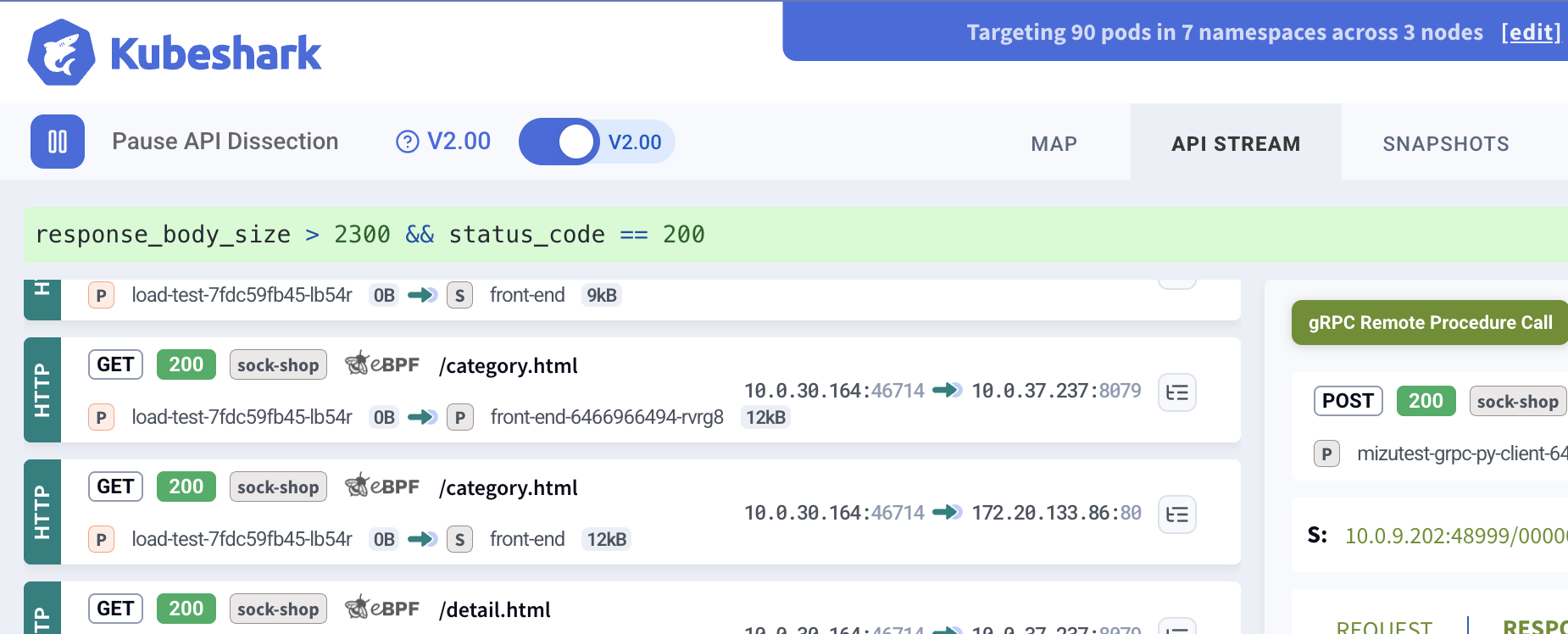
KFL (Kubeshark Filter Language) is the query language used across Kubeshark — the dashboard, MCP, and API all return results matching KFL queries. It uses Common Expression Language (CEL) to query traffic with Kubernetes, API, and network semantics.
KFL queries affect what traffic is returned from the indexed database. They do not impact which traffic is captured. For controlling what traffic is captured, see Capture Filters.
Using KFL
In the dashboard, enter a KFL expression in the query input box:
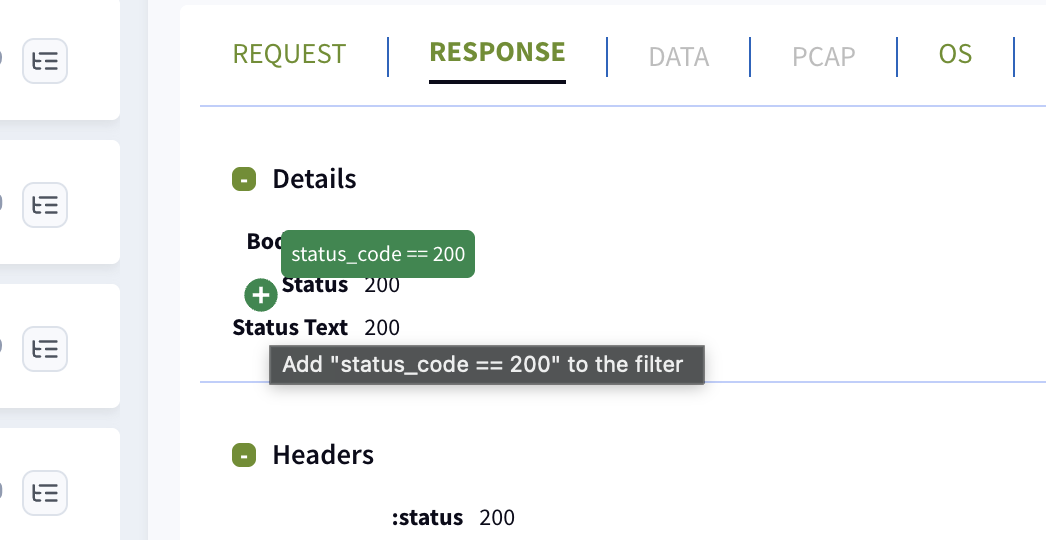
Every element visible in the dashboard has a green + button that can be clicked to automatically add query expressions — helping build complex queries without typing.
KFL queries also work via MCP (for AI agents) and the API, using the kfl parameter.
Quick Examples
# HTTP GET requests with errorshttp && method == "GET" && status_code >= 400# Traffic to a specific namespacedst.pod.namespace == "production"# DNS queries for specific domainsdns && "google.com" in dns_questions# Large HTTP responseshttp && response_body_size > 10000# Failed gRPC callsgrpc && grpc_status != 0# Slow requests (over 5 seconds)http && elapsed_time > 5000000# Recent traffic (last 5 minutes)timestamp > now() - duration("5m")
Operators
Category
Operators
Comparison
==, !=, <, <=, >, >=
Logical
&&, ||, !
Arithmetic
+, -, *, /, %
Membership
in
Ternary
condition ? true_val : false_val
String Functions
Function
Description
str.contains(substring)
Substring search
str.startsWith(prefix)
Prefix match
str.endsWith(suffix)
Suffix match
str.matches(regex)
Regex match (RE2 syntax)
size(str)
String length
Collection Functions
Function
Description
size(collection)
List/map/string length
key in map
Key existence check
map[key]
Value access (errors if key missing)
map_get(map, key, default)
Safe access with default value
value in list
List membership
Time Functions
Function
Description
timestamp("2026-03-14T22:00:00Z")
Parse ISO timestamp
duration("5m")
Parse duration string
now()
Current time (snapshot at filter creation)
Supported Variables
Network-Level Variables
Variable
Type
Description
Example
src.ip
string
Source IP address
"192.168.1.1"
dst.ip
string
Destination IP address
"10.0.0.1"
src.port
int
Source port number
8080
dst.port
int
Destination port number
80
protocol
string
Detected protocol type
"HTTP", "DNS", "TCP"
Kubernetes Variables
Variable
Type
Description
src.pod.name
string
Source pod name
dst.pod.name
string
Destination pod name
src.pod.namespace
string
Source pod namespace
dst.pod.namespace
string
Destination pod namespace
src.service.name
string
Source service name
dst.service.name
string
Destination service name
src.service.namespace
string
Source service namespace
dst.service.namespace
string
Destination service namespace
namespaces
[]string
All namespaces involved (src + dst)
pods
[]string
All pod names involved (src + dst)
services
[]string
All service names involved (src + dst)
node_name
string
Node name
node_ip
string
Node IP address
local_node_name
string
Node name of local peer
remote_node_name
string
Node name of remote peer
Pod fields automatically fall back to service data when pod info is unavailable — dst.pod.namespace works even when only service-level resolution exists.
Labels and Annotations
Variable
Type
Description
local_labels
map
K8s labels of the local peer
local_annotations
map
K8s annotations of the local peer
remote_labels
map
K8s labels of the remote peer
remote_annotations
map
K8s annotations of the remote peer
local_process_name
string
Process name on the local peer
remote_process_name
string
Process name on the remote peer
Always use map_get() for labels and annotations — direct access like local_labels["app"] errors if the key doesn’t exist:
# Filter by destination portdst.port == 80# Filter by IP address prefixsrc.ip.startsWith("192.168.")# Filter by multiple portsdst.port == 80 || dst.port == 443 || dst.port == 8080# Port rangedst.port >= 8000 && dst.port <= 9000
Kubernetes Filtering
# Traffic from a specific podsrc.pod.name == "web-server-123"# Traffic to a specific namespacedst.pod.namespace == "production"# Inter-service communicationsrc.service.name == "api-gateway" && dst.service.name == "user-service"# Traffic involving production namespace"production" in namespaces# Filter by pod labels (safe access)map_get(local_labels, "app", "") == "payments"# Filter by process namelocal_process_name == "nginx"
HTTP Filtering
# GET requestshttp && method == "GET"# API endpointshttp && url.contains("/api")# Client errors (4xx)http && status_code >= 400 && status_code < 500# Server errors (5xx)http && status_code >= 500# Specific header presenthttp && "authorization" in request.headers# Header value matchhttp && request.headers["content-type"] == "application/json"# URL pattern matchinghttp && url.matches(".*/api/v[0-9]+/.*")# Large responseshttp && response_body_size > 1000000# Slow requests (over 5 seconds)http && elapsed_time > 5000000# GraphQL errorsgql && status_code >= 400
DNS Filtering
# DNS requests onlydns && dns_request# Specific domain queriesdns && "google.com" in dns_questions# Failed DNS lookupsdns && dns_response && status_code != 0# A record queriesdns && "A" in dns_question_types# DNS responses with answersdns && dns_response && size(dns_answers) > 0
gRPC Filtering
# All gRPC trafficgrpc# Filter by gRPC method namegrpc && grpc_method == "SayHello"# Failed gRPC calls (non-OK status)grpc && grpc_status != 0# Specific gRPC status code (e.g. 5 = NOT_FOUND)grpc && grpc_status == 5# Combine with HTTP variablesgrpc && method == "POST" && status_code == 200
DNS Resolution Filtering
Use src.dns and dst.dns to filter traffic by the resolved DNS name of a peer’s IP address. This works on any protocol, not just DNS traffic.
# Traffic to a specific external domaindst.dns == "db.example.com"# Traffic involving a domain (either direction)src.dns.contains("example.com") || dst.dns.contains("example.com")# Check if any peer resolved to a domain"db.example.com" in dns_resolutions# External traffic (resolved DNS, not internal)dst.dns != "" && !dst.dns.endsWith(".internal")
# TCP errorstcp && tcp_error_type != ""# Open connections with high volumeconn && conn_state == "open" && conn_local_bytes > 1000000# High packet-rate flowsflow && flow_local_pps > 1000# High-bandwidth TCP flowstcp_flow && flow_local_bps > 5000000# Connections with detected L7 protocolsconn && "HTTP" in conn_l7_detected
Negation
# Everything that is NOT HTTP!http# HTTP responses that aren't 200http && status_code != 200# Exclude health checkshttp && !path.contains("/health")# Exclude system namespace!(src.pod.namespace == "kube-system")
Time-Based Filtering
# After a specific timetimestamp > timestamp("2026-03-14T22:00:00Z")# Time rangetimestamp >= timestamp("2026-03-14T22:00:00Z") && timestamp <= timestamp("2026-03-14T23:00:00Z")# Last 5 minutestimestamp > now() - duration("5m")
Complex Filters
# HTTP API requests from internal networksrc.ip.startsWith("192.168.") && http && method == "POST" && url.contains("/api")# Error conditions across protocolshttp && status_code >= 500 || (tcp && tcp_error_type != "")# Production namespace with HTTP errorssrc.pod.namespace == "production" && http && status_code >= 400# Cross-namespace communicationsrc.service.namespace != dst.service.namespace# Filter by capture sourcecapture_source == "ebpf_tls"
Type Safety
KFL is statically typed. Common gotchas:
status_code is int, not string — use status_code == 200, not "200"
elapsed_time is in microseconds — 5 seconds = 5000000
timestamp requires the timestamp() function — not a raw string
Map access on missing keys errors — use key in map or map_get() first
List membership uses value in list — not list.contains(value)
Default Values
When a variable is not present in an entry, KFL uses these defaults:
Type
Default
string
""
int
0
bool
false
list
[]
map
{}
bytes
[]
Performance Tips
Protocol flags first — http && ... is faster than ... && http
startsWith/endsWith over contains — prefix/suffix checks are faster
Specific ports before string ops — dst.port == 80 is cheaper than url.contains(...)
Use map_get for labels — avoids errors on missing keys
Keep filters simple — CEL short-circuits on &&, so put cheap checks first
Empty filters match all — an empty filter string matches all traffic
KFL vs Capture Filters
Aspect
KFL Queries
Capture Filters
Purpose
Query indexed traffic
Control what is captured
Impact
Dashboard, MCP, API
Resource consumption
Applied
After indexing
Before capture
Syntax
CEL expressions
Helm values / Dashboard settings
For those familiar with Wireshark: KFL is analogous to Wireshark’s display filters, while Capture Filters are analogous to Wireshark’s BPF filters.