Display Filters / KFL
Display filters control what traffic appears in the L7 API Stream. Using Kubeshark Filter Language 2 (KFL2), you can filter by protocol, status code, Kubernetes identity, headers, payloads, and more.
Display filters only affect what is shown in the dashboard. They do not impact what traffic is captured. For controlling captured traffic, see Capture Filters.
Using Display Filters
Enter a KFL2 expression in the filter input at the top of the dashboard and click Apply.
| Filter Type | Scope |
|---|---|
| Display filters | Local—affects only the current browser tab |
| Capture filters | Global—affects all users and sessions |
Multiple browser tabs can show different filtered views of the same cluster.
Quick Examples
# HTTP errors (4xx and 5xx)
http && status_code >= 400

# Traffic to a specific service
dst.service.name == "payment-service"

# Traffic in production namespace
dst.pod.namespace == "production"

# GET requests to /api endpoints
http && method == "GET" && url.contains("/api")

# DNS queries
dns && dns_request

# Show only live traffic
timestamp >= now()

# Large responses (over 1MB)
http && response_body_size > 1000000
Click-to-Add Filters
Hovering over UI elements with a green + sign indicates they are queryable. Clicking appends the corresponding filter to your KFL2 statement.
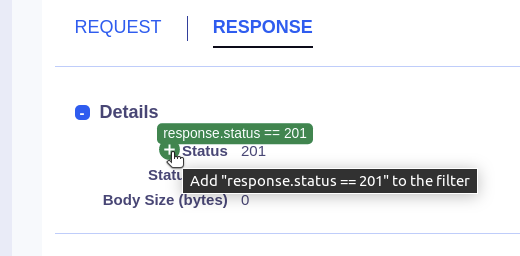
This allows building complex filters without typing the full expression.
Common Filters
By Protocol
http                    # HTTP traffic
dns                     # DNS traffic
redis                   # Redis traffic
kafka                   # Kafka traffic
tls                     # TLS/encrypted traffic
By HTTP Status
http && status_code == 200           # Success
http && status_code >= 400 && status_code < 500   # Client errors
http && status_code >= 500           # Server errors
By Kubernetes Identity
src.pod.name == "web-server-123"
dst.pod.namespace == "production"
src.service.name == "api-gateway"
"production" in namespaces
By Headers
http && "authorization" in request.headers
http && request.headers["content-type"] == "application/json"
By Time
timestamp >= now()                    # Live traffic only
timestamp > timestamp("2024-02-01T14:00:00Z")   # After specific time
timestamp > now() - duration("5m")    # Last 5 minutes
Shareable URLs
When a filter is applied, it’s embedded in the browser URL. Copy and share the URL to give colleagues the same filtered view.
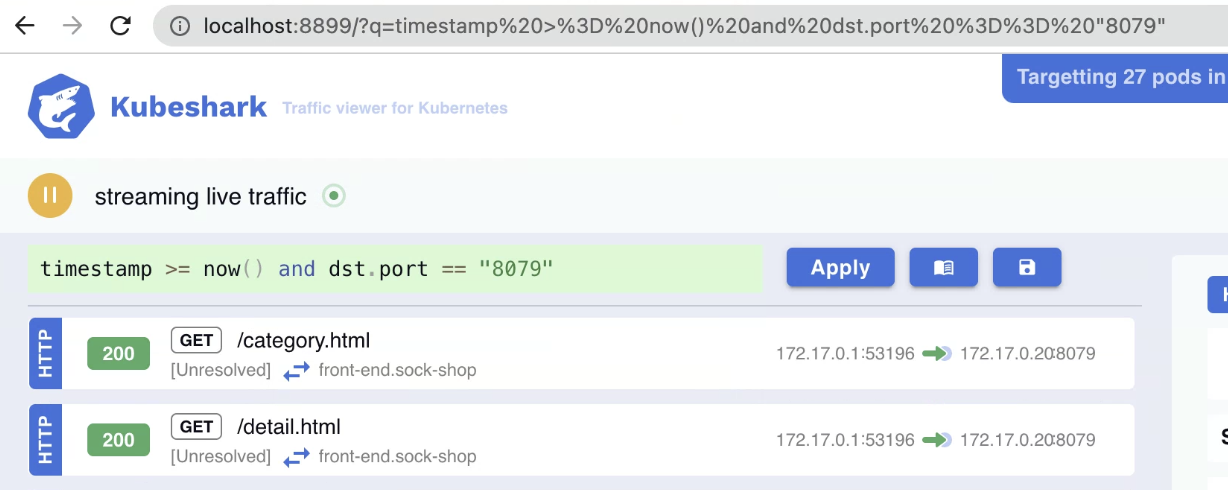
Display Filters vs Capture Filters
| Aspect | Display Filters (KFL2) | Capture Filters |
|---|---|---|
| Purpose | Filter what is displayed | Filter what is captured |
| Impact | Dashboard view only | Resource consumption |
| Scope | Single browser tab | Cluster-wide |
| Syntax | CEL expressions | Helm values / Dashboard |
For those familiar with Wireshark: KFL2 is analogous to Wireshark’s Display Filters, while Capture Filters are analogous to Wireshark’s BPF filters.
Full Reference
For complete KFL2 syntax, supported variables, and advanced examples, see the KFL2 Reference.
| Category | Examples |
|---|---|
| Network variables | src.ip, dst.port, protocol |
| Kubernetes variables | src.pod.name, dst.service.namespace |
| HTTP variables | method, status_code, url, request.headers |
| DNS variables | dns_questions, dns_answers |
| CEL operators | &&, ` |