Performance
L7 traffic indexing requires significant CPU and memory resources to process and analyze network traffic in real-time. Understanding performance characteristics helps optimize Kubeshark for your environment.
Resource Consumption
Real-time traffic indexing accounts for most of Kubeshark’s resource usage. Traffic capture itself remains comparatively lightweight—parsing operations consume far more compute than the initial packet capture phase.
| Operation | CPU Usage | Memory Usage | Where |
|---|---|---|---|
| Raw Capture (L4) | Low | Low | Production |
| Real-time Traffic Indexing (L7) | High | High | Production |
| Delayed Traffic Indexing | Low (configurable) | Low (configurable) | Non-production |
Hub Streaming Capacity
Worker indexing and Hub streaming are separate resource budgets. The Hub aggregates worker results and delivers them to clients; it can lose UI-stream entries under CPU contention even when the workers are keeping up.
In a synthetic Hub streaming test with 200 workers and one client, a Hub with a 2 CPU request and no CPU limit delivered 20,132.56 entries/s over 30 minutes with zero measured UI-stream drops. Average/peak process RSS was 390/401 MiB. This measures delivery of already prepared entries, not packet capture, L7 dissection, snapshot queries, or browser rendering.
Use Workload Resources for starting requests and Hub Streaming Benchmarks for the measured tiers, controlled CPU-request comparison, and diagnostic limitations. The methodology page explains the private perfshark harness and what readers can verify from the public data. Validate real traffic and concurrent clients before treating these numbers as deployment capacity.
Raw Capture vs Real-Time Indexing
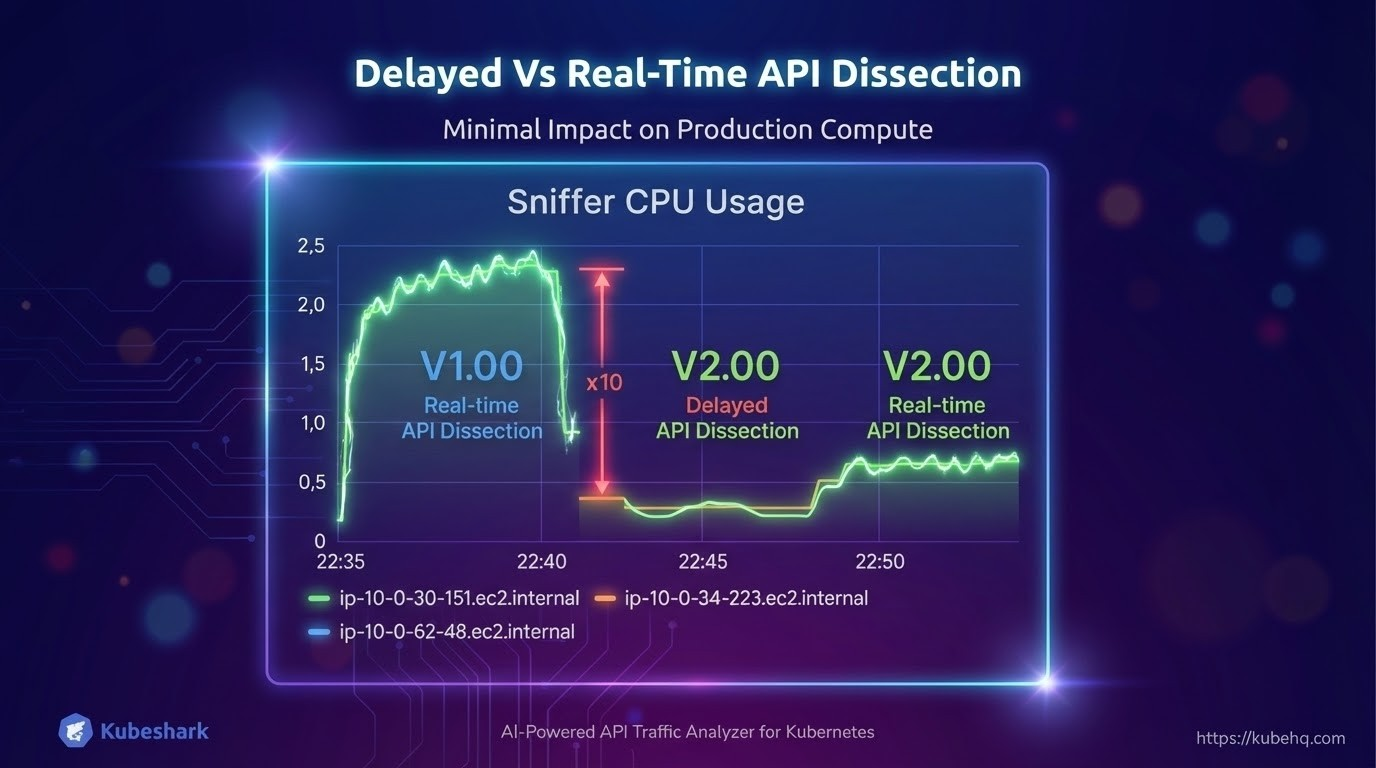
Most of the heavy lifting in V2.00 involves writing data to disk, which is far less resource-intensive than real-time parsing. This is why Raw Capture can run continuously with minimal impact, while real-time indexing should be enabled on-demand.
- Raw Capture - Primarily disk I/O, minimal CPU
- Real-time Indexing - CPU and memory intensive parsing operations
Delayed Indexing
To minimize production impact, V2.00 introduces delayed traffic indexing. Indexing is executed on non-production compute resources with low, configurable resource consumption.
This enables:
- Continuous lightweight capture on production nodes
- Indexing processing on non-production compute with configurable resources
- Real-time indexing enabled on-demand only when needed for investigation
Reducing Resource Consumption
Automatic Indexing Timeout
To preserve resources, L7 traffic indexing automatically stops after a configurable idle period (default: 5 minutes). This behavior can be overridden. See Enabling / Disabling L7 Traffic Indexing for details.
Disable Indexing
Disable L7 traffic indexing entirely using tap.capture.dissection.enabled=false. Indexing can be enabled on-demand when needed:
tap:
  capture:
    dissection:
      enabled: false
Use Capture Filters
Reduce the number of targeted workloads using Capture Filters to lower resource consumption:
tap:
  regex: "frontend-.*"
  namespaces:
    - production
Run Raw Capture Only
Let Raw Capture run continuously while keeping indexing disabled:
tap:
  capture:
    dissection:
      enabled: false        # Indexing disabled
    raw:
      enabled: true         # Raw capture active
This provides complete traffic history with minimal overhead, enabling indexing only when investigation is needed.